
Garmin and COROS
Besides Apple Watch, ALTiDUX works with COROS and Garmin watches.
You need
- For workouts beyond the plan's first 7 days: ALTiDUX PRO or its free week.
- For your race plan on the watch: ALTiDUX PRO or its free week, and your race's course from its GPX file: how to add it.
- For Garmin Connect: the iPhone app, and ALTiDUX PRO or its free week.
Open Settings. On the iPhone, tap the gear at the top right of Today. On Android, tap Runner, then Workout settings.
COROS: on Send the workouts to COROS, read what is sent, switch on the consent and tap Connect COROS. You sign in on COROS's own page; ALTiDUX never sees your password.
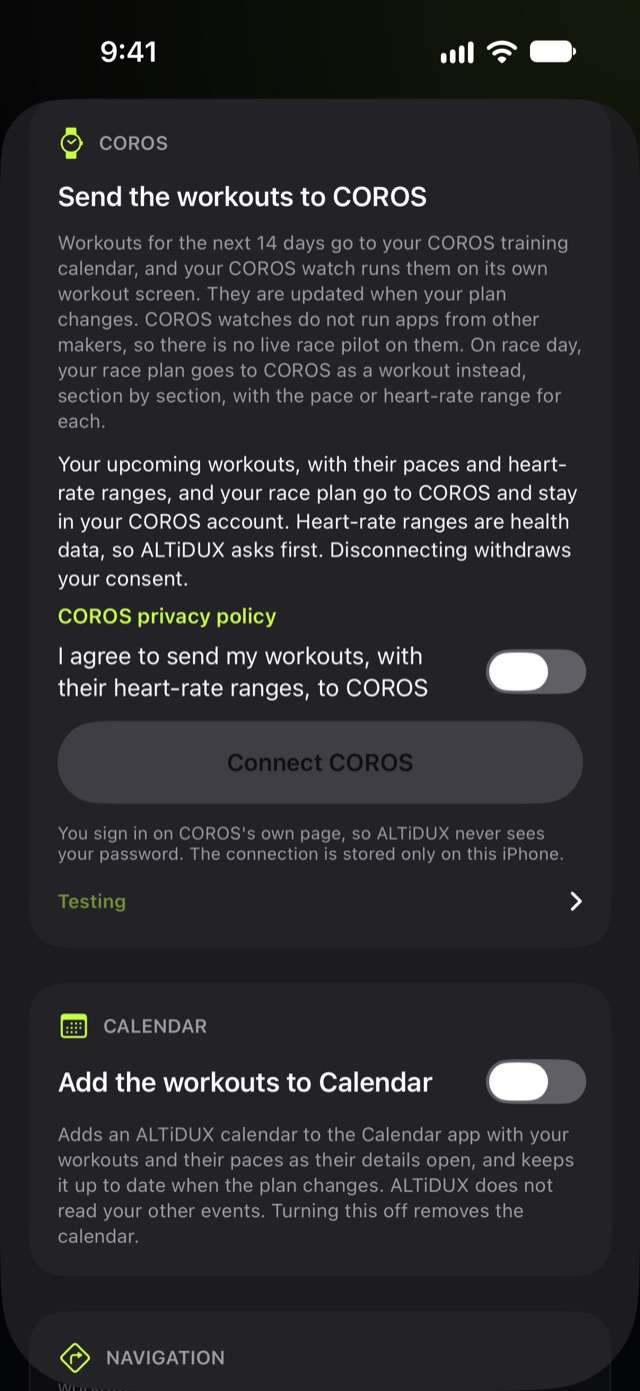
With ALTiDUX PRO or its free week, the workouts of the next 14 days go to your COROS training calendar and are kept up to date when the plan changes. Without PRO, only those of the plan's first 7 days go. Your COROS watch runs them with its own workout screen.
Garmin (with the iPhone or Android app): install ALTiDUX on the watch from the Connect IQ Store. You also need the Garmin Connect app on your phone.
On the iPhone, in Settings, on Race pilot on your Garmin watch, tap Choose the Garmin watch and pick it in Garmin Connect. On Android there is nothing to pick: the race plan goes to every watch connected in Garmin Connect on the phone.
From then on, Send to the watch on the race plan sends it to the Garmin too. On race day, open ALTiDUX on the watch and press Start race: the race pilot.
Garmin Connect (with the iPhone app): in Settings, on Workouts on your Garmin calendar, read what is sent, switch on the consent and tap Connect Garmin. You sign in on Garmin's own page; ALTiDUX never sees your password.
The workouts of the next 14 days go to your Garmin Connect calendar and follow your plan when it changes. Your Garmin watch gets them when it syncs with the Garmin Connect app and runs them with its own workout screen. A race in those days with its course file goes to Garmin Connect as a course too.
Good to know
- COROS watches do not run apps from other makers, so there is no live race pilot on them. On race day, with ALTiDUX PRO and your course's GPX file, your race plan goes to COROS as a workout, section by section, each with its pace or heart-rate range. Without them, the race-day workout is one step at race pace.
- ALTiDUX cannot take a moved or skipped workout off the COROS calendar: remove it in the COROS app.
- On a Garmin, in a workout from your Garmin Connect calendar, a step without a set time ends when you press the lap button.
- If the Garmin does not answer, open ALTiDUX on it and send the race plan again.
- At an aid station on a Garmin watch, press the lap button to stop there, and press it again to run on.
- Your runs come back through Apple Health on iPhone, or Health Connect on Android, whichever watch records them.
- With Garmin Connect connected, a workout you run from your Garmin Connect calendar comes back straight from Garmin, with its laps and map. Disconnect on the same card ends it.
Related guides
Another question? See Help or write to hello@altidux.com.