
Move or skip a workout
Can't run on Tuesday? Move the workout to another day of the same week, or skip it.
You need
- For workouts beyond the plan's first 7 days: ALTiDUX PRO or its free week.
On the Plan tab, under Calendar, tap the workout's day, then Change the day.
Under This week: drag it or tap a day, tap the day you want, or drag the workout there by its handle. Each day says what a move there means: Free day, Swap days, Next to strength training.
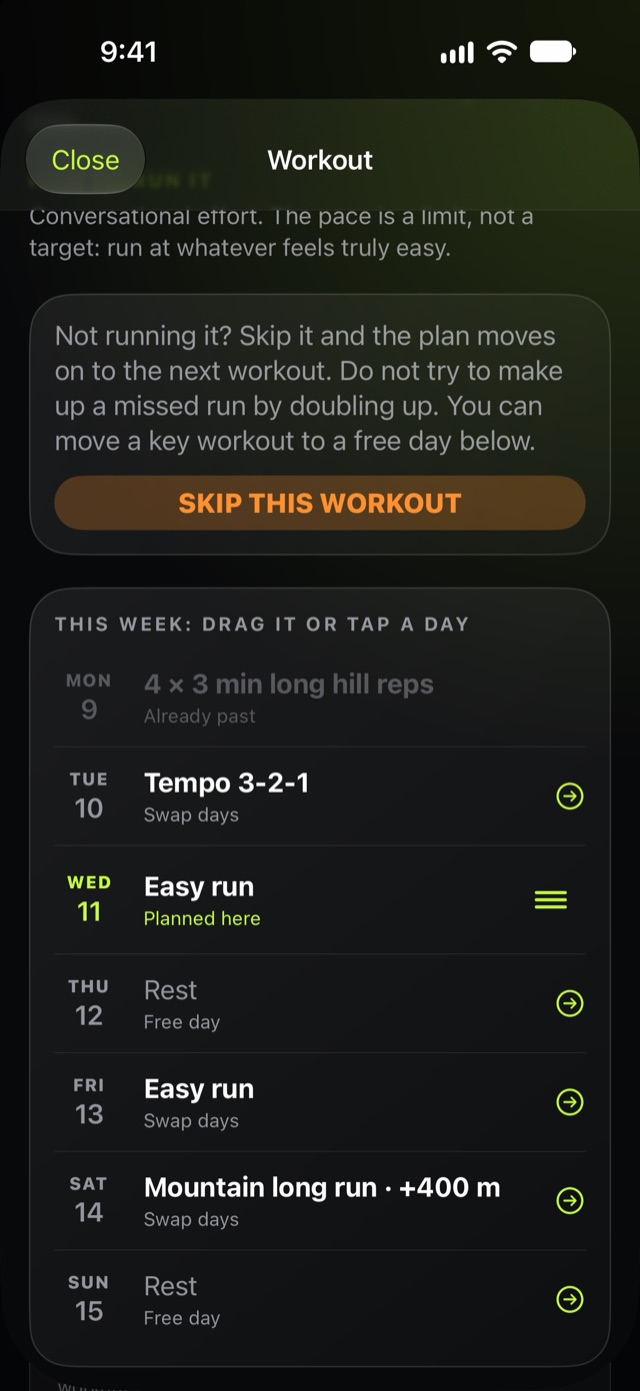
The workout moves at once. Changed your mind? Tap Undo in the message at the bottom of the screen.
Can't run it at all this week? Tap Skip this workout.
Good to know
- A workout can move only within its own week (Monday to Sunday), to today or a later day.
- Race day stays where it is: to change it, use Change goal.
- Two hard workouts on days next to each other: the app warns you, and the choice is yours.
- You can also move a workout in the list The whole week: touch and hold it, then drag it to another day.
- Ran a workout on another day of its week, with any watch? When the run comes in, ALTiDUX asks Was this a workout of your plan? Yes, count it moves the workout to that day and ticks it. With ALTiDUX on Apple Watch, the workout moves by itself.
Related guides
Another question? See Help or write to hello@altidux.com.